
Are you wondering how you can get your books printed in paperback or hardcover? This should help!
Print-on-Demand
This is how you get a single book printed at a time. Think of it as made-to-order.
There are multiple services out there, but which would work best for you?
I am only calculating costs for a paperback, as my debut novel is a paperback. I may make it a hardcover eventually, but for now it is this.
Options selected across the board:
- 195 pages
- 6″*9″
- Perfect Bound
- Interior color, standard black and white
- 60#, white, uncoated
- matte
I have only printed through Amazon and IngramSpark. I found Amazon to be easier to use, more flexible with type-setting options, and I liked the quality better even though the pages were more thin. However, I am definitely open to changing this.
Please note, you need an ISBN to publish a paperback. Some places may require a bar code, but this isn’t necessary.
Offset Printing
If you do not want to do print-on-demand and can do offset printing, you will want to check out this post by Reedsy.
Check Out this Post from Reedsy Anyway

They may have more information than I do on here.
IngramSpark
They have a calculator to help you determine the printing costs as well as the compensation/royalties that you can expect from your book. You can access the printing calculator here. The cost to print a book similar in size to mine is $4.30.
Ingram is a must if you want to be able to sell your books commercially to bookstores. The majority of them will utilize this service. They can purchase the book at the retailers discount of ~40%. This means royalties should be around $3.49.
What is great is other companies are paired with Ingram so your book is automatically pulled over to them such as Bookshop.org and Kobo. You will need to go on to these websites and claim your author profile. You don’t need to do this to get paid, but to interact and such you will.
You must have an ISBN for your paperback and your epub on Ingram. We all know, those cost money. It’s your barrier to entry, so to speak.
Ingram does not have great customer service and they do nickle and dime you when you need to make revisions or want a proof of your epub file.
TLDR:
- + great network
- + auto-pulls to other websites
- + handy pricing calculator
- + resources available
- + no set-up fee
- – nickle and dime you
- – customer service isn’t great
- – difficult to use (just upload a Word Doc)
- – no bulk ordering options
Biggest plus, if you are struggling with it, feel free to reach out to me on instagram or Threads and I will do my best to help you out.
Lulu
Using their printing calculator, with the options listed above, the cost to print a book similar to mine is $6.30 per book.
They do have bulk purchasing options. With bulk ordering, of course you can have cost savings. Example from their website below:
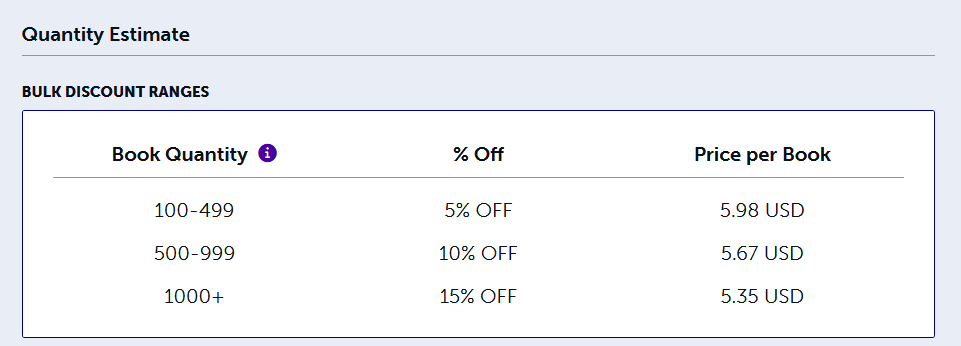
If you are like me and you’re renting, limited space, this is not an option.
You may be wondering why the price of the book matters? You have to price your book competitively with other similar books in the market place. The more the book costs to print, the less royalties for you.
Because of the increase in price, I did not give Lulu further time or attention. If you have, I would love to hear about your experience, benefits and cons, etc.
TLDR
- -Expensive for print-on-demand
- + Reasonable for bulk orders
Barnes and Noble
For real, they are getting into the print-on-demand action. Printing costs on their calculator are $4.34. I will get back to you with how this went and resources available.
Blurb
Blurb offers both print-on-demand and bulk pricing. I had trouble getting their pricing calculator to work. I had to open it in an incognito window.
Based off of the options provided, I chose Trade Book, 6″*9″, soft cover.
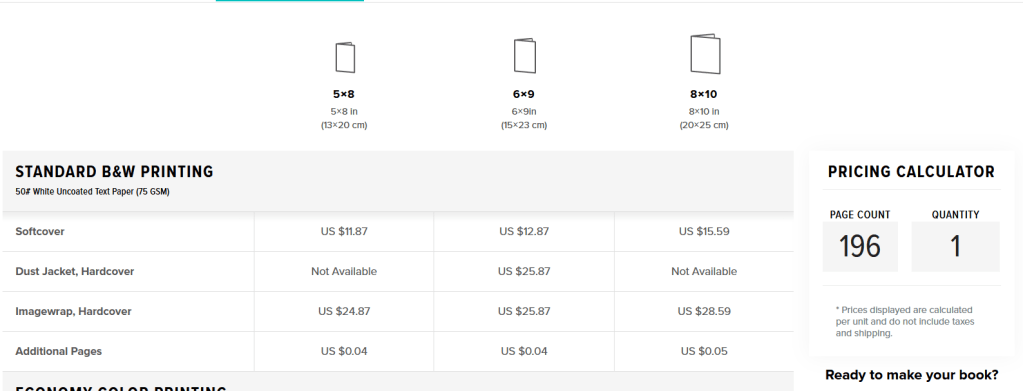
That lines up to $12.87 per book. Too rich for my blood.

$12.87*99=$1,247.13 with a 25% discount is $955. That’s $9.65 per book, which is more expensive than Lulu.
Draft2Digital
Also offers a calculator for determining printing price and royalty. Using the options listed above, we are looking at…

Comparable unit cost, but the royalties are less than IngramSpark or KDP.
If you’re looking to move away from KDP, this could be a decent option.
- + Transparency in pricing. Check it out!
- + Yes, author copies!
- + Ships internationally to 32 countries (including Australia and the UK)
- + You can make coupons without having to be in a specific program (KDP, some options only available if you are part of Kindle Universe-if you are not familiar, its kind of a monopoly)
Definitely worth a deeper dive. More to come.
Book Vault
You can get sprayed edges through Bookvault. That’s pretty cool. They offer bulk and print-on-demand, but access to all of this comes at a start-up price. They say this is to make sure you are “committed” to using them. Like writing an entire book didn’t show your commitment?
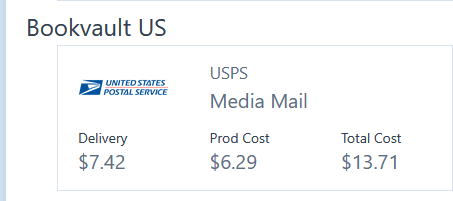
To be honest, I’m not paying to try this out. The book price is high, apparently they give you more flexibility with royalties. Reedsy did a review of them.
TLDR
- +sprayed edges
- -start-up costs
- -expensive production costs
KDP
I know, Amazon is the devil, but they also give the most royalties.

It is easy to use, easy to upload, and a wide range of resources (including videos) to help learn the systems.
You are able to do per-orders through KDP, but I don’t believe they are included in your release-day sales. They are separate. You can easily advertise on Amazon.
Their printing quality varies. You may get books that arrive damaged. The paper is more thin than Ingram.
You have the options for distribution systems. I did not take a screen shot when I set this up half a year ago. One provides 30% royalties, the other 70%. I am pretty sure its KU vs. KDP self-publishing. KU is nice because its less marketing, but also less royalties. KDP is your own marketing, lots of effort, but higher royalties. If you use KU, you cannot sell through any other sources or it violates the terms and conditions.
TLDR
- + Good royalties
- + Easy to use system
- + Good learning resources
- + Wide distribution when choosing expanded distribution
- +/- Kindle Universe– may be for you, it’s not for me
- – It’s Amazon
- – Quality in print suffers
- – No bulk ordering options
If you are looking to make some money, and do print-on-demand, Draft2Digital, KDP, and Ingram seem to be the best options.
If you want to do sprayed edges, there are plenty of small businesses that offer this as well. I will gather some resources and make a post on that.



 The Comfy Hermit
Leave a comment